Questions about organizing your trip
Straight answers to the things people actually ask before using a trip organizer. Every answer here is also a chapter in the video, so you can read it or watch it.
Petrel Voyage on the App Store for iPhone and Apple Watch, or use it in any browser.
Every question on this page
- How do I organize all my travel confirmations in one place?
- How does a booking confirmation become an itinerary?
- Can I upload a PDF, or does it have to be a forwarded email?
- Can I use a trip planner without making an account?
- How do I move my trips from TripIt, Wanderlog or Tripsy?
- Does Petrel Voyage read my email?
- Do I need a travel app if I already have the airline app?
- Can I see my travel itinerary offline, without wifi?
- Where should I keep passport details while travelling?
- How do I know how long it takes to get between places on my trip?
- Where do I keep boarding passes and tickets for a trip?
- What will the weather be like on my trip, and what should I pack?
- Can I see my itinerary on an Apple Watch?
- How do I add a trip to my calendar so it stays updated?
- Can the people I share a trip with edit it, and does that cost extra?
- How do I share a trip itinerary with the people I am travelling with?
- How do I plan a group trip, a bachelor party or a golf weekend?
- How do I split costs on a group trip?
- How do I track work travel receipts for an expense report?
- How do I track which countries I have visited?
- Is Petrel Voyage free?
- What devices does Petrel Voyage work on? Is there an Android app?
- What if I have not booked anything yet?
- What is the best TripIt alternative?
Getting started
How do I organize all my travel confirmations in one place?
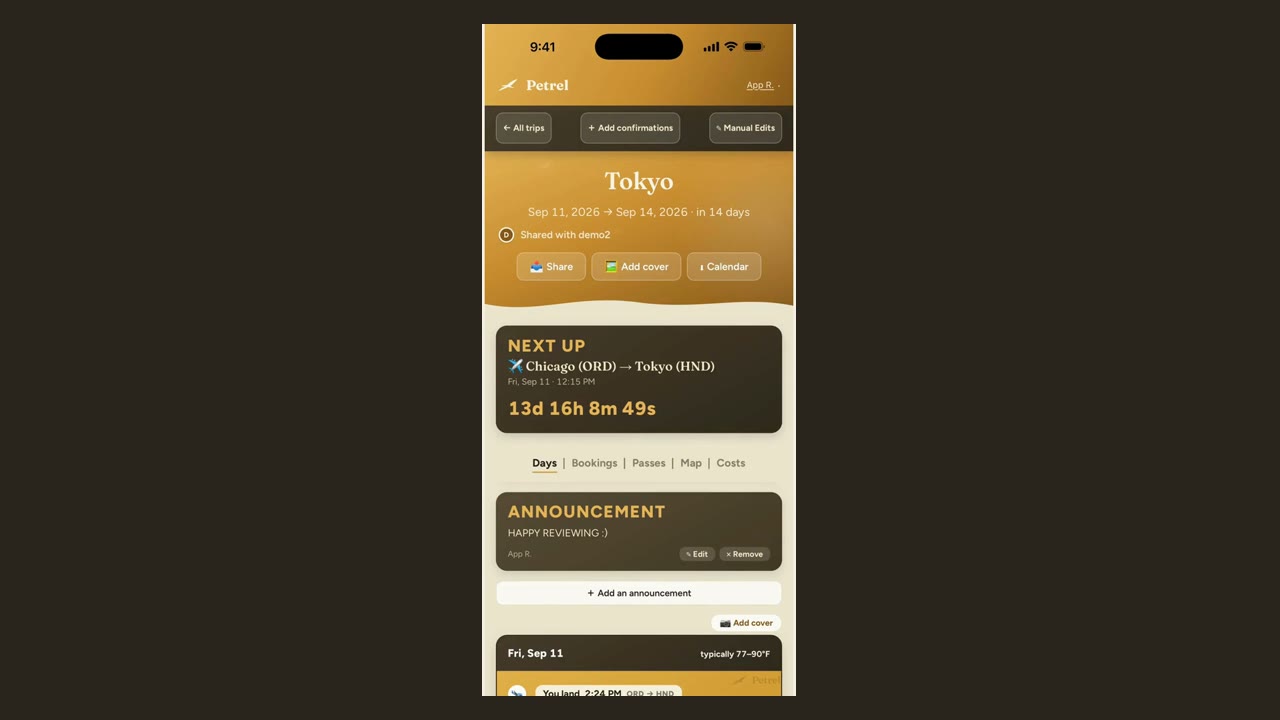
Stop keeping one app per booking and put the whole trip into a single itinerary, in order, day by day. Send your booking confirmations to Petrel Voyage and it reads each one and files it, so the flight, the hotel check in, the dinner reservation and the train all sit on the same page in the order they happen.
How does a booking confirmation become an itinerary?
You send the confirmation and it gets read and filed for you, usually in under a minute. There are three ways in: forward the email to the address your account gets, share a file into the app (a PDF from the airline, a screenshot of a text message, a photo of a paper booking), or type it in by hand. A trip you type behaves exactly like one that was read automatically.
Can I upload a PDF, or does it have to be a forwarded email?
A PDF works, and so does nearly anything else you were sent. Upload the airline PDF straight from your files, a screenshot of a booking text, a photo of a paper voucher, or a folder of them at once, and each one is read into the same day-by-day trip. Forwarding the confirmation email works too, and is usually quicker when the booking is still sitting in your inbox. The one thing to upload rather than email is a spreadsheet, because the email route accepts PDFs, photos and calendar files but not spreadsheets.
Can I use a trip planner without making an account?
Yes. You can build your first trip in Petrel Voyage before making an account at all, with no credit card. If you decide to keep what you built, making an account carries that trip over, and nothing you did as a guest is thrown away.
How do I move my trips from TripIt, Wanderlog or Tripsy?
You do not have to retype anything. Export your trips from the app you use now and hand the export straight over. Most of these apps produce a calendar export or a spreadsheet, and both import directly, so your existing trips arrive as real itineraries rather than a wall of text. Upload a spreadsheet in the app rather than emailing it, because the email route accepts PDFs, photos and calendar files but not spreadsheets.
Privacy and access
Does Petrel Voyage read my email?
No. Petrel does not connect to your inbox and reads only what you hand it. You forward a confirmation or share a file into the app, and that specific document is what gets read. Nothing else in your mail is visible to it, because it was never connected in the first place. Petrel also does not sell your data and does not train AI on your bookings.
Do I need a travel app if I already have the airline app?
The airline app covers your flight, and your flight is not your trip. It is genuinely good at what it owns: the gate, the delay, the boarding pass. What it does not know is the name of your hotel, what time dinner is, that the person you are travelling with booked the rental car, or how long it takes to get between them. Petrel Voyage is the place the whole trip exists in order, and it shows flight status alongside everything else.
Can I see my travel itinerary offline, without wifi?
Yes. Trips you have already opened work with no signal, including the hotel address and tomorrow’s plan, not just a boarding pass. There is one limit worth stating plainly: offline is read only. You can see the whole trip but cannot edit it until you reconnect.
Where should I keep passport details while travelling?
Petrel Voyage has a vault, and what goes into it is encrypted on your own device, which means it is not readable by us. It suits the things you need on a trip and do not want loose in a photo library: a passport number, an ID, an insurance policy, an emergency contact. The trade to understand is that the key comes from your passphrase and never leaves your browser, so there is no reset. If you lose the passphrase, the documents are gone.
Using a trip
How do I know how long it takes to get between places on my trip?
Each stop shows the travel time from where you are staying, on foot, on a bike or driving, with a handoff to your map app for turn by turn directions. There is also a map of the whole trip, so you can see whether tomorrow makes geographic sense before you are standing outside in the rain.
Where do I keep boarding passes and tickets for a trip?
Passes and tickets attach to the booking they belong to, so the ticket for something is stored on that something. Attach a photo or a PDF to a flight, a stay or a reservation and it opens full screen when you need to show it. Petrel does not invent a scannable code: a confirmation number is not a boarding pass, and the live pass with the barcode that actually gets scanned belongs in your airline app or in Apple Wallet, because that is the copy that updates when your seat or gate changes.
What will the weather be like on my trip, and what should I pack?
Each day of a trip shows the weather that place typically has at that time of year. That is not a forecast for three months out, because nobody has one; it is what the city is normally like that week, which is what you need when deciding what to bring. Closer to departure a packing email arrives, based on where you are going and how long you will be there.
Can I see my itinerary on an Apple Watch?
Yes. The next thing on your trip appears on your wrist without taking your phone out, with how long until it and the rest of the day underneath. The moments you most need your itinerary tend to be the moments your hands are full: coming out of customs, getting into a taxi, or trying to remember the name of the hotel.
How do I add a trip to my calendar so it stays updated?
You subscribe once and the trip appears in your normal calendar. This is a subscription rather than an export, which matters: an export is a snapshot that goes stale the moment a flight moves, and a subscription updates itself. Flights, check ins and reservations then sit next to your meetings, which is usually where you actually look.
Travelling with other people
How do I plan a group trip, a bachelor party or a golf weekend?
Everyone adds their own bookings to the same itinerary. This is the case that breaks a group chat: six people, four of them booked their own flights, one booked the house, somebody has the tee times, and the actual plan exists nowhere. Invite everyone and each person’s bookings land on the shared trip, so the organizer stops being a switchboard. You can also pin a note to the top of the trip for the things people keep asking.
How do I split costs on a group trip?
Log what people pay as you go and it works out who owes whom at the end, instead of you doing it on the flight home. Add an expense, say who paid and who it was split between, and photograph a paper receipt to have the total read and the image attached. What you get at the end is netted down to the payments that would actually settle it, not a list of every transaction. Costs in another currency stay grouped by currency rather than being silently added together at an invented exchange rate.
How do I track work travel receipts for an expense report?
Work trips are kept separate from personal ones, and any trip can produce a reimbursement ready expense report with the receipts attached: costs itemized, with vendors, categories and totals. This exists because the reimbursement work is not the travel. It happens a week later, at your desk, when you are trying to remember what a charge was.
After the trip, cost and devices
How do I track which countries I have visited?
Petrel Voyage keeps a travel footprint. Every trip you finish adds its countries and cities to a map with the totals underneath, which answers the question of how many countries you have actually been to rather than reconstructing it from memory and old photos. A couple of days after a trip ends, a recap of it also arrives by email with your own photos in it.
Is Petrel Voyage free?
Your first trip is free with every feature and no credit card. It is a real first trip, not a trial with things switched off. After that, Voyager is $49 a year for unlimited trips, or you can unlock a single extra trip for $9.99 if you would rather not subscribe. What you pay for is more trips, not features held back from what you already started using.
What devices does Petrel Voyage work on? Is there an Android app?
It runs on iPhone, on Apple Watch, and in any browser on any computer. The iPhone app is on the App Store. There is no Android app yet. The web version does work on an Android phone in the meantime.
What if I have not booked anything yet?
There is a free library of ready made itineraries by city and by country, readable without an account. They are real day by day plans with times and local tips rather than a list of places. When you do book something, Petrel Voyage can build the plan from your own confirmations instead.
What is the best TripIt alternative?
Petrel Voyage builds the itinerary for you from your confirmations, the way you would expect from TripIt. What differs is that sharing is free rather than a paid tier and anyone you invite can edit, trips work offline, the costs and the split live on the trip itself instead of in a separate app, and your first trip is free with every feature switched on. TripIt invented this category and is dependable when confirmations arrive as clean email text; the sharing and alerting people usually want sits in its paid tier.
Try it on your next trip
Forward a confirmation email, a screenshot, or a PDF and watch Petrel build your day-by-day itinerary.
Plan your first trip freeFirst trip free. No account, no credit card.