Best TripIt alternatives, 2026
The best TripIt alternatives in 2026, honestly compared
You booked the trip. Petrel organizes it. Here are the alternatives worth knowing, what each one is genuinely best for, what it costs, and where it falls short.
One distinction sorts this whole list: are you organizing a trip you already booked, or planning a new one? TripIt, Petrel, TripWaffle, Tineo, and Google Travel are organizers. Wanderlog is a planner. Tripsy sits between. Start there.
Petrel
Best if your bookings are already made and scattered across your inbox.
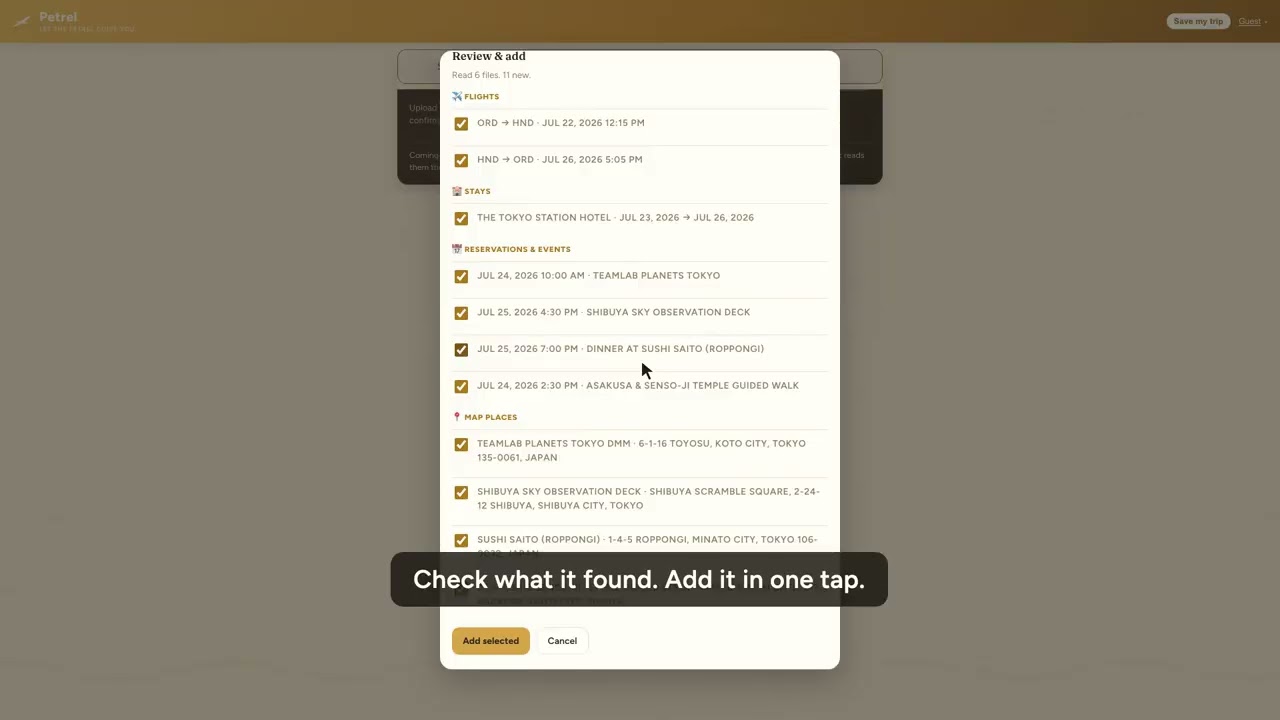
Drop in confirmations in any format, forwarded emails, PDFs, photos, or a whole folder of screenshots, and Petrel builds a day-by-day itinerary in under a minute, with travel time between stops. It shows live flight status, works offline, invites companions to view and edit free, splits costs, handles work trips with expense reports, and mails you a mapped recap after you get home.
Wanderlog
Best if your trip starts on a map, not in your inbox.
Wanderlog is the strongest planner here: discover places, optimize a driving route, build a day plan, and collaborate with friends in real time. Its free tier is genuinely generous. Reservation import and collaboration are free; auto Gmail scanning and offline maps are Pro.
Tripsy
Best if you live in the Apple ecosystem and want a refined native app.
Tripsy is beautifully built, with family sharing, email parsing, TripIt import, and a rare lifetime license. The catch is platform: creating and editing trips is Apple-only, with Android on a waitlist and the web view-only. It is also the priciest option here.
TripWaffle
Best if you want a free forever tracker and only forward emails.
A well-liked indie project: forward a confirmation, including PDF attachments, and it tracks the trip with flight alerts (delays, gate, baggage belt), pre-trip checklist emails, calendar feeds, travel stats, and offline access. No monetization, which travelers love, though it does raise a long-term sustainability question.
Tineo
Best if you want AI parsing with a connected Gmail inbox.
Tineo has a capable free tier, email import, AI parsing, collaboration, offline, and flight alerts, with an Ultra upgrade. It connects to Gmail to pull confirmations automatically. It leans hard on AI, which some travelers love and some find over-hyped.
Google Travel
Best if all your bookings land in Gmail and you just want to glance.
Google Travel (successor to the retired Google Trips app) quietly builds a trip timeline from bookings in your Gmail, with zero setup. It is free and automatic, but Gmail-only, essentially private to you, with no uploads, no real sharing, and no offline app.
TripIt (the one you are replacing)
Still fine if you want the classic and TripIt Pro's flight alerts.
TripIt invented this category and is dependable. Its real-time alerts, gate changes, and point tracking (all Pro) remain a genuine strength. But the free tier is basic, sharing is view-only, there is no AI parsing of anything beyond email, and the product has aged.
Parsing is where the complaints cluster. Of the 147 most recent US App Store reviews, 43 are rated three stars or lower, and about seven of those describe bookings that never arrived: flight times imported wrong, PDFs ignored, trips not recognized at all. One reviewer reports being told by support that the booking vendor must have changed its email format, and that every stop would have to be typed in by hand. That is the structural limit of matching confirmations against known vendor templates, and it is the gap Petrel is built around: it reads the confirmation itself, in any format, rather than checking it against a list.
Prices as listed on each vendor's own site for a US visitor, checked 2026-10-15.
No account needed. Free for your first trip. Voyager is $49 a year for unlimited trips when you are ready.
One thing worth checking before you pick
Several apps in this category, including some of the newer free ones, start by asking to connect your Gmail so they can find bookings for you. That is genuinely less work. It also means handing over your whole mailbox to get an itinerary, and an itinerary is a detailed map of where you will be and when. Worth deciding which trade you want before you sign up: Petrel does not connect to an inbox, so you forward or upload the confirmations you want organized and that is all it sees. If an app is free with no ads and no paid tier, it is also fair to ask what the business model eventually is.
Using two apps on purpose
These apps are not all substitutes for one another. Flighty is the best live flight tracker and deliberately does not build an itinerary; Petrel builds the itinerary and deliberately does not chase gate changes. Flighty reads flights from a calendar and Petrel publishes one, so running both is a real option rather than a compromise. Pick one app per job instead of one app for everything.
Moving off TripIt without exporting anything
TripIt has no native export, and its public API has been closed to new integrations for years, so there is no third-party tool you can just sign up for. What TripIt does still offer is a calendar feed, and Petrel reads it directly.
- 1
Copy the feed link from TripIt
Settings → Calendar Sync, turn on Enable Calendar Feed, then copy the feed URL. It usually starts
webcal://. - 2
Paste it into Petrel
On the import card press Calendar link and paste. Petrel reads your upcoming trip out of the feed and lays it out day by day. Nothing to download, nothing to re-forward.
- 3
Check it, then travel
You review everything before it is saved. Your first trip is free and stays free.
It brings your upcoming trips across, not years of archive: the feed is windowed to the trip in front of you. To bring an older trip over, paste the link again while that trip is open.
Common questions
What is the best free TripIt alternative in 2026?
For a free start, Petrel unlocks your entire first trip with every feature and no credit card, TripWaffle is free forever with email-forward parsing and flight alerts, and Google Travel is free but limited to a passive Gmail timeline.
What is the best TripIt alternative for organizing booked trips?
Petrel. It turns booking confirmations in any format, including PDFs, photos, and folders of screenshots, into a day-by-day itinerary automatically, with live flight status, offline access, free sharing, and expense reports. Your first trip is free.
What is the best TripIt alternative for trip planning?
Wanderlog, when your trip starts on a map: discovering places, optimizing routes, and planning with friends. Its free tier is generous and Pro is about $39.99 a year.
Can I move my trips out of TripIt now the API is closed?
Yes, through the calendar feed, which TripIt still offers. In TripIt open Settings → Calendar Sync, turn on Enable Calendar Feed, and copy the feed URL. Paste it into Petrel's import card under Calendar link and Petrel reads your upcoming trips straight out of it. TripIt has no native export and its public API is closed to new integrations, so the calendar feed is the practical route out.
What is the best TripIt alternative for Apple users?
Tripsy, a polished Apple-native app for iPhone, iPad, and Mac with family sharing. It is $59 a year or $299 lifetime, but Apple-only.