TripIt alternative
A simpler, modern alternative to TripIt
You booked the trip. Petrel organizes it. Forward an email, upload a PDF, or drop a whole folder of screenshots and get one organized trip in under a minute.
Your first trip is completely free. No feature limits. No credit card.
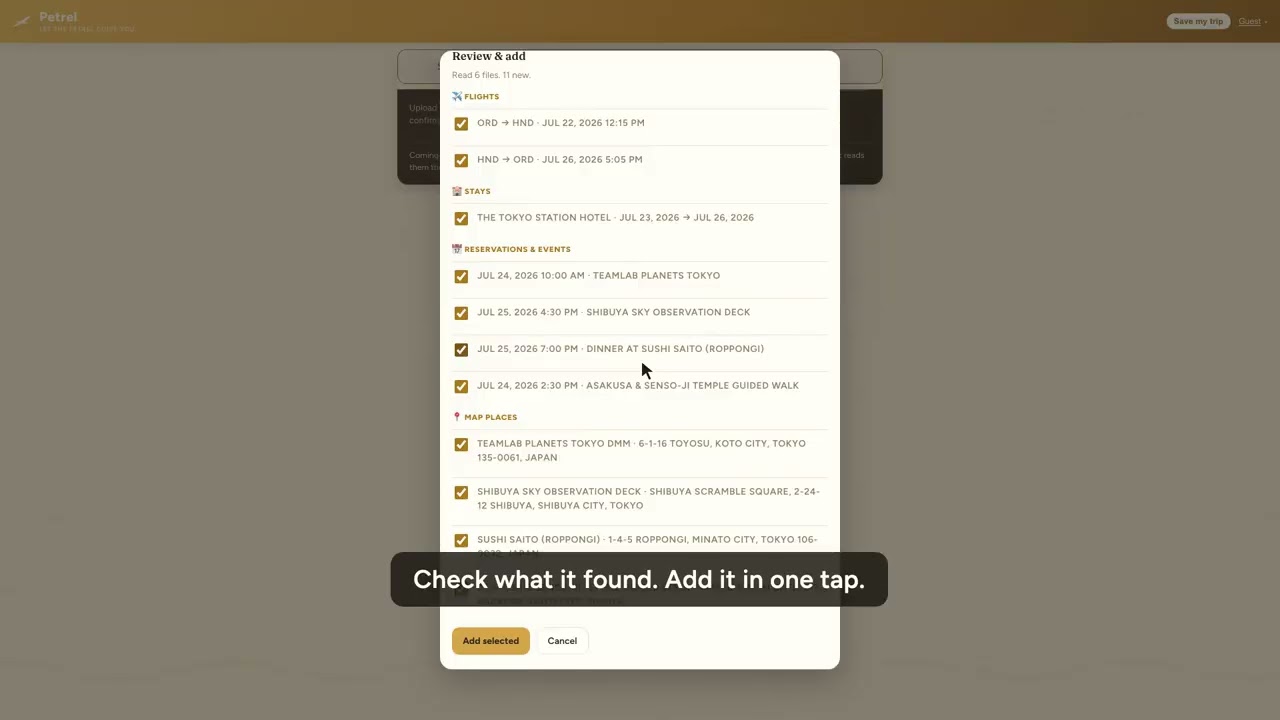
If you have used TripIt to keep flights and hotels in one place, Petrel will feel familiar, then quickly better. It takes more kinds of input, keeps everyone in your group in sync for free, works on the plane, and remembers your trip after you land. It is also a genuinely free TripIt alternative: your entire first trip is unlocked with every feature, so you can compare them on a real trip before paying. Here is how the two stack up.
Petrel Free first trip |
TripIt Free / Pro $49 a yr |
|
|---|---|---|
| Build an itinerary from a forwarded email | ✓ | ✓ |
| Also read PDFs, photos, and whole folders of screenshots | ✓ | Limited |
| Full parsing free, before you pay anything | ✓ First trip, every feature | Basic on free |
| Invite companions to view and edit, free for them | ✓ | Sharing only |
| Works offline on the plane | ✓ | Pro |
| Calendar sync | ✓ | ✓ |
| Post-trip recap a mapped story of where you went | ✓ | – |
| Separate work and personal trips | ✓ | – |
| Receipts + reimbursement-ready expense report vendors, categories, totals, receipts attached | ✓ | Pro, limited |
| Travel stats + map of every trip | ✓ | – |
| Your trip is never deleted, even on the free plan | ✓ | – |
No account needed. Try it right now. Free for your first trip. Voyager is $49 a year for unlimited trips when you are ready.
How to switch from TripIt to Petrel
Switching takes about a minute, and there is nothing to migrate or export first.
- 1
Paste your TripIt calendar link
In TripIt open Settings → Calendar Sync, turn on Enable Calendar Feed, and copy the feed URL. In Petrel press Calendar link on the import card and paste it. Petrel reads your upcoming trip straight out of TripIt and lays it out, with nothing to export or download first. TripIt has no native export and its public API is closed to new integrations, so the calendar feed is the practical route out.
Prefer files? A calendar (.ics), PDF, or spreadsheet export works too. Or start fresh: forward the same confirmation emails you would send TripIt to plans@petrelvoyage.com, or upload the PDFs and screenshots you already have. A whole folder at once is fine.
- 2
Petrel builds the itinerary
In under a minute it reads every flight, hotel, and reservation and lays them out in order, day by day, with travel times between stops.
- 3
Share it, edit it, travel
Invite anyone you travel with to view and edit for free, sync it to your calendar, and open it offline at the gate. About a week after you get home, a mapped recap lands in your inbox.
Why travelers switch to Petrel
- 📥
Anything in, one itinerary out
Forward an email, upload a PDF, photograph a paper voucher, or drop a folder of 14 screenshots. Petrel reads them all and lays your trip out in order, day by day.
- 👥
Everyone you travel with, free
Invite a partner, family, or coworker to view and edit the trip. They never need to pay, and it works on any device.
- ✈️
It works when you land with no signal
Your itinerary is available offline, so there is no paywall surprise at the gate or in a foreign airport.
- 🧾
Built for business travel too
Keep work trips separate, attach receipts as you go, and export a clean expense report with vendors and totals for reimbursement.
- 🔒
We do not connect to your inbox
Some trip apps ask to read your whole mailbox. Petrel does not. You forward the confirmations you want organized, or upload them, and that is all Petrel ever sees. It does not sell your data or train AI on your bookings. An itinerary is a detailed map of where you will be and when, which is worth being careful with.
- 🛡️
Passports and documents behind Face ID
Keep passport scans, visas and insurance details in an encrypted vault that opens with Face ID or Touch ID. Encrypted on your device, so the documents you would least like to lose are not sitting in a chat thread or a camera roll.
- 🚄
Trains, buses and ferries, not just flights
Most trip apps are built around flights and treat everything else as a note. Petrel reads rail, coach and ferry confirmations as real journeys, with times and stations, which matters if your trip is mostly on the ground.
- 💷
Who owes who, settled
Add shared costs as you go and Petrel nets them down to a single figure per person, so the end of a group trip is one number rather than a spreadsheet.
- 🧳
A packing note before you go
Shortly before the trip, Petrel mails you what the weather is actually doing where you are going, so the packing decision is made on a forecast rather than a guess.
- 🛂
A passport that fills itself in
Every country you reach earns a stamp, with fifty travel achievements and a map of everywhere you have been. It builds itself from the trips you were already keeping, with nothing extra to log.
- 🗺️
A mapped recap, about a week after you land
About a week after your trip, Petrel mails you a recap: every city, stay, and reservation, mapped into a story worth keeping.
And if flight alerts are what you actually want: Flighty does that better than either of us. It reads flights from a calendar, and Petrel publishes one, so you can run both — Flighty watching the flights, Petrel holding the hotels, reservations and the day-by-day a flight tracker does not cover. Your calendar link is under Tools & settings.
Common questions
Is Petrel a good TripIt alternative?
Yes. Petrel builds a complete day-by-day itinerary from your booking confirmations, works offline, lets anyone you invite view and edit for free, mails you a trip recap, and exports expense reports. Your first trip is free with every feature and no credit card.
Can I import my trips from TripIt?
Forward the same confirmation emails you would send to TripIt, or upload the PDFs and screenshots you already have, and Petrel rebuilds the itinerary in under a minute.
How much does Petrel cost?
Your first trip is completely free. Voyager is $49 a year for unlimited trips, and a single extra trip is $9.99. Your trips are never deleted, even if you never pay.
Does it work for business travel and expenses?
Yes. Work trips stay separate from personal ones, you can attach receipts to any flight, stay, or expense, and export a reimbursement-ready report with vendors, categories, totals, and receipts attached.
Is there a free TripIt alternative?
Yes. Petrel's first trip is completely free with every feature and no credit card, so it works end to end as a free TripIt alternative before you decide to pay. After that, Voyager is $49 a year for unlimited trips, or a single extra trip is $9.99, and your trips are never deleted even on the free plan.
Does Petrel have flight alerts like TripIt Pro?
Not yet. TripIt Pro leads on real-time flight and gate-change alerts and reward-point tracking. Petrel focuses on turning any confirmation into one itinerary you can share, free on your first one, and works offline at the gate. Flight alerts are on the roadmap.