Email Forwarding for Travel Itineraries: How to Turn Confirmation Chaos Into One Clean Trip Plan
You booked the flights in March, the hotel in April, and the rental car last week during a coffee break. Now the trip is in nine days and your travel plan lives in seventeen different emails, two of which you cannot find. Sound familiar?
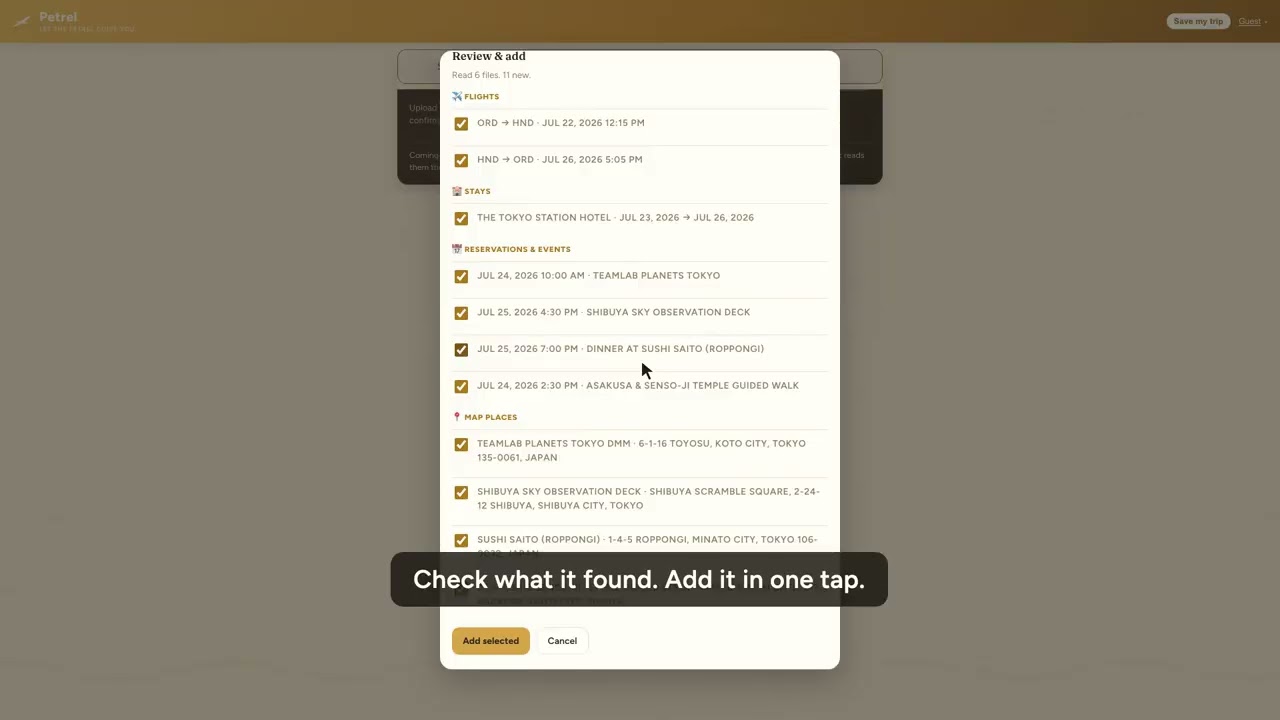
Email forwarding is the fastest fix for this. Instead of copying flight numbers and check-in times into a spreadsheet by hand, you forward each confirmation to a service that reads it and drops the details into one itinerary, sorted by day. No retyping, no missed reservations, no scrolling your inbox at the gate.
This is a walkthrough of how it works, where the common approach falls short, and how to set it up so your next trip organizes itself.
What "email forwarding itinerary" actually means
The idea is simple. Every booking you make sends you a confirmation email. A flight from the airline, a hotel from the booking site, a tour from the activity platform. Each one contains the same core facts: what, when, where, and a confirmation number.
An email forwarding itinerary tool gives you an address to forward those emails to. It pulls out the important bits and builds a single trip plan you can open on your phone, share with the people you're traveling with, and check when your flight gets a new gate.
The payoff is that your itinerary assembles itself as you book, rather than becoming a weekend project the night before you leave.
The catch most people hit
Here's what the tutorials skip: forwarding only works cleanly when the confirmation email is clean.
Airlines and hotels format their emails however they like. Some are neat and machine-readable. Plenty are a mess of promotional banners, tiny print, and reservation details buried three scrolls down. Older forwarding tools were built to parse a tidy confirmation, so when a booking arrives as a weird layout, a receipt from a foreign booking site, or a message with the details stuck inside an attachment, they choke or grab the wrong data.
And forwarding assumes the confirmation is in your email at all. A lot of the important stuff isn't:
- A ferry ticket someone screenshotted and texted you
- A tour voucher that's a PDF attachment, not text in the body
- A group trip where costs and rooms are tracked in a shared spreadsheet
- A confirmation your travel companion booked and forwarded to you as an image
If your tool only reads forwarded email text, all of that falls through the cracks and you're back to manual entry for exactly the bookings that are hardest to type out.
How to set it up right (the checklist)
Whatever tool you use, this sequence gets you a clean itinerary with the least effort:
1. Gather before you forward
Do a quick sweep first. Search your inbox for "confirmation," "booking," "itinerary," and "e-ticket." Check your texts and photos for anything a friend sent. Pull the PDF attachments into one folder. Two minutes here saves you from a half-finished itinerary later.
2. Forward or upload everything in one go
Send the emails to your forwarding address, and add the odd ones (screenshots, PDFs, that spreadsheet) through whatever upload option the tool offers. Do it in a batch so the trip builds all at once instead of in dribs and drabs.
3. Check the day-by-day order
Once the itinerary generates, scan it chronologically. Confirm your arrival day lines up with check-in, and that nothing landed in the wrong time zone. This is where a good tool earns its keep: it should already have the sequence right.
4. Invite your travel companions
If you're not traveling solo, share the itinerary now, not at the airport. Everyone seeing the same plan kills the "wait, what time is the tour?" group text.
5. Make sure it works offline
The moment you actually need your itinerary is often the moment you have no signal: a foreign airport, a train underground, a hotel with wifi that requires a login you don't have yet. Confirm your plan is readable without a connection before you fly.
Where Petrel fits
Petrel was built for the messy reality, not the tidy demo. You forward a confirmation email and it reads it, same as you'd expect. But it also reads the stuff that trips up other tools: screenshots, PDFs, and even spreadsheets. If a friend texts you a photo of a booking, that goes in too. Petrel pulls the details out of any of those formats and lays them into one day-by-day itinerary in under a minute.
A few things that make the difference on an actual trip:
- Live flight status. Gate, terminal, and delays update in your itinerary, so you're not toggling to a separate app to find out your gate moved.
- Offline access. Your full plan is there whether or not you have signal, which is exactly when you tend to need it.
- Free collaborators. Invite the people you're traveling with to view, edit, and split costs at no extra charge. No per-seat fee for bringing your family along.
- An automatic trip story. When you get home, Petrel turns the trip into a recap you can keep or share, no writing required.
On privacy, Petrel keeps it straightforward: no scanning your inbox, no selling your data, and no training AI on your bookings. You forward what you want organized, and that's all Petrel touches.
Forwarding vs. TripIt, Tripsy, and Wanderlog
If you've used TripIt, Tripsy, or Wanderlog, the forwarding concept will feel familiar. The practical differences are in what they can read and what setup they demand.
TripIt built its name on email forwarding, and it's solid when your confirmations arrive as clean text. Where it gets frustrating is the non-email stuff and the odd formats, which is a growing share of how people actually book now. Petrel's edge is reading any input format, screenshots and PDFs and spreadsheets included, and letting you start without creating an account first. You can see your itinerary before you commit to a login. For the full side-by-side, see our TripIt alternative comparison.
That "no account to start" part matters more than it sounds. Most tools make you sign up, verify, and set up a profile before you find out whether the thing even parses your bookings correctly. Petrel lets you try it on a real trip first and decide after.
The short version
Email forwarding turns a pile of confirmations into one itinerary, and it's the single best habit for anyone who books trips in pieces over weeks. Just pick a tool that reads more than tidy emails, works when you're offline, and lets your travel companions in for free.
Petrel does all three, and your first trip is free with no account or credit card needed. Forward your next batch of confirmations, or drop in a screenshot, and watch the itinerary build itself at https://petrelvoyage.com.
Try it on your next trip
Forward a confirmation email, a screenshot, or a PDF and watch Petrel build your day-by-day itinerary.
Plan your first trip freeFirst trip free. No account, no credit card.